Xiaomi 18 Pro review
Device with privacy screen is true eye-catcher
Here's another review of a Chinese phone—this time, the Xiaomi 18 Pro. A global version has been announced, but it is not yet available. We couldn't wait, so we ordered a unit and here are our findings.
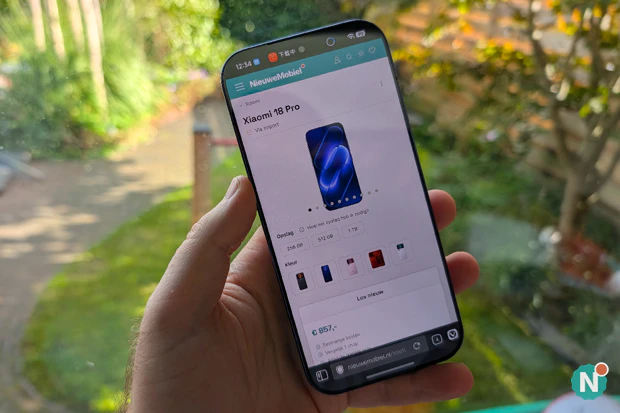
- Pros: Battery life lasting for days, excellent value for money, selfies taken with the main camera, lightning-fast and stays cool, powerful vibration motor, fast fingerprint scanner, chinese apps can be disabled, Google Pay and banking apps work, 100W charger and case included
- Cons: Google services require some work, privacy screen isn’t very effective, No 5G on 700 and 1800 MHz, slow charging without the 100W charger, No Android Auto, eSIM, or Dutch language support, no built-in magnets, sound lacks depth
The Xiaomi 17 Pro already impressed us back then with its second screen on the back, and when the Xiaomi 18 Pro was announced with its improved secondary screen and privacy screen on the front, we couldn’t wait. We had to test one out.
So we opened our wallets once again and ordered one for €857 from TradingShenzhen. That’s the same seller where we previously ordered the Oppo Find N6. Anyone who read that review back then knows we ran into issues with the Chinese firmware. So we were a bit skeptical, but we were still won over by the 7,000 mAh battery and the privacy screen. It took 10 days from order to delivery, and we didn’t have to pay any additional import fees; everything was included in the price.
The question you might be asking now: did we run into the same issues with the Xiaomi 18 Pro as we did back then with the Oppo Find N6? Yes, there were some issues this time as well, but we were able to resolve most of them. You can read here how we did that, and we’ll also dive deeper into the hardware, the software, potential competitors worth considering, and the things you should keep in mind when ordering a phone with a Chinese ROM.
What’s in the Box
100W charger (MDY-18-EW) (Type A)
USB-A-to-USB-C cable
SIM card ejector tool
Chinese quick start guide
Screen protectors x2 (already applied)
Clear case
Type A to Type C travel adapter (included separately)
Just like with the Oppo, we found a charger in the box again, along with a travel adapter that TradingShenzhen includes separately. This is so you can plug the Type A plug—which is used in China and the U.S.—into European outlets as well. You can then charge your device at lightning speed (a whopping 100 watts). We’ll explain later why this isn’t just a luxury.
The box also contains the usual suspects: a SIM card ejector tool, a USB cable, and some documentation. The device came with a screen protector on the front and a camera plate on the back. Both screens are therefore protected right out of the factory. A clear case was also included.
Color and Finish
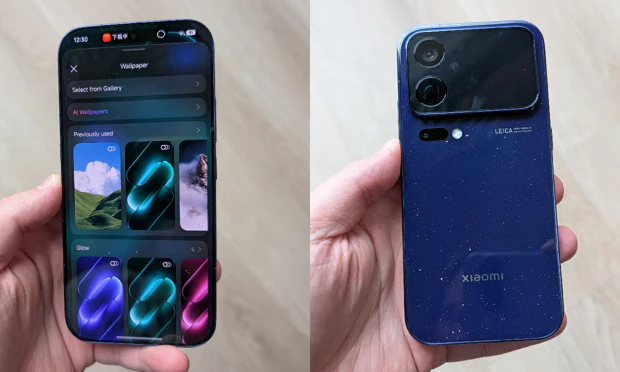
That other eye-catcher we mentioned is the color. We chose Starry Blue, which has a shimmer to it. That gives it depth and draws attention, even away from the screen. This version also has a glossy finish (both the back and the sides), which makes it prone to fingerprints. You don’t really notice it because of the dark color, but it’s something to keep in mind. In addition to blue, Xiaomi offers pink, white, and black versions, which do have a matte finish. There’s also a red version available with more memory and partial transparency, though that will cost you a bit extra.
Design
The design Xiaomi has applied to the 18 Pro largely follows the style Apple uses for its iPhone lineup. This has rightly drawn some criticism for Xiaomi, but the fact is that it’s popular and it sells.
Buttons and Ports
On the right side of the device, from top to bottom, we find the volume button—which is a single, integrated piece—and a power button. The power button is customizable via the software; by default, it launches the AI assistant, but you can also disable that. On the left side, there’s also an AI button that you can personalize: a single press activates Xiaomi Hyper XiaoAI or does nothing, while a long press activates silent mode, Do Not Disturb, privacy screen, voice memo, or Hyper XiaoAI again.
The top is completely unobstructed, and at the bottom you’ll find the SIM card slot, microphone, USB port, and speaker grille. Sound also comes out of a small slit at the top of the screen. It’s so small you can’t even fit your fingernail in it. That’s ideal, because the smaller it is, the less dirt gets inside. The sound isn’t really impressive, though; it lacks depth and sounds a bit too narrow for our taste.
Back and Weight
The biggest eye-catcher is, of course, the back, for several reasons. First of all, because of the second screen. It fills the camera module surrounding the two cameras. If you’re looking for the third camera, it’s somewhat awkwardly positioned below and next to the flash. We deliberately say “awkwardly placed” because, during testing, we often accidentally covered it with our finger. Since the camera module protrudes quite a bit, it’s a great spot to rest your finger and support the device.
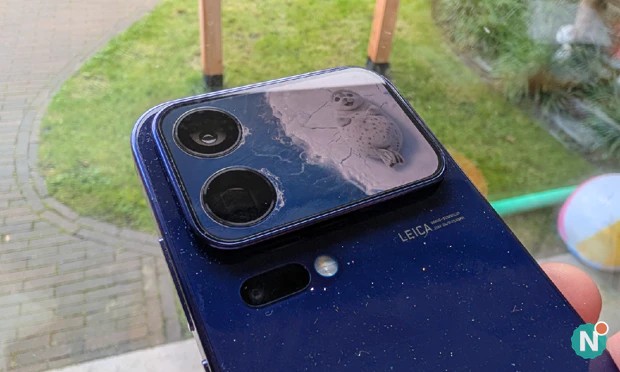
The weight might be an issue for some: at 208 grams, it’s not exactly light. For comparison: the Galaxy S26 weighs 167 grams. Xiaomi does have an excuse for those extra grams, though, as the 7,000 mAh battery and the rear display naturally add to the weight. The white, black, and pink versions made of fiberglass are fractionally lighter at 203 grams. Anyone picking it up for the first time expects a lighter device.
Display
In many reviews, this is a short section, but not for the 18 Pro. We can write twice as much here because of the presence of a second screen—which is quite unusual for a non-foldable phone. We don’t have to go back to the days of old-fashioned flip phones to see this: the Tecno Pova 8 5G and the Nothing Phone (3) also have it, albeit in a much more stripped-down version.
The Second Screen
The screen on the back of the 18 Pro measures 2.7 inches (diagonally) and has a resolution of 912 by 596 pixels. To put that in perspective: that’s nearly 60 percent of the surface area of the very first iPhone screen. The maximum brightness and refresh rate are the same as those of the front screen: 4,000 nits and 120 Hz. So one screen isn’t better or worse than the other.
So what’s the point? This time, there’s more than last year. Xiaomi has a store where you can download apps. There are AI wallpapers featuring animals and anime characters, large clocks, widgets (calendar, countdown, stock prices, a counter to track how many glasses of water you’ve drunk). And then there are the little apps you can interact with. For example, there’s a seal that slaps its belly when you click on it. If you do this long enough, it sinks through the ice. We don’t quite get the point of it, but the kids at home are having a blast with it.

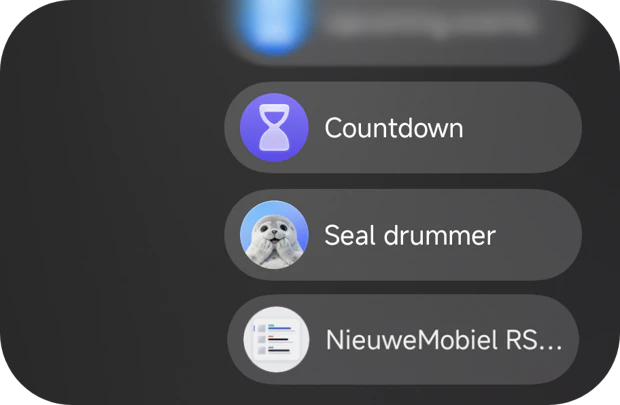
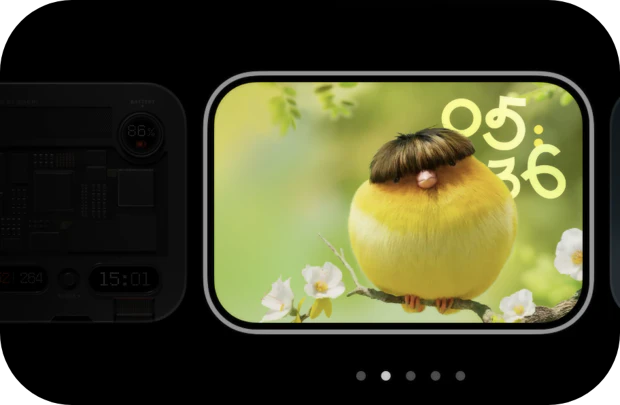

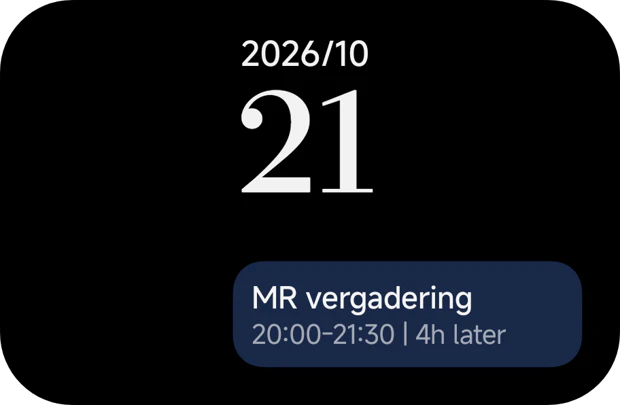
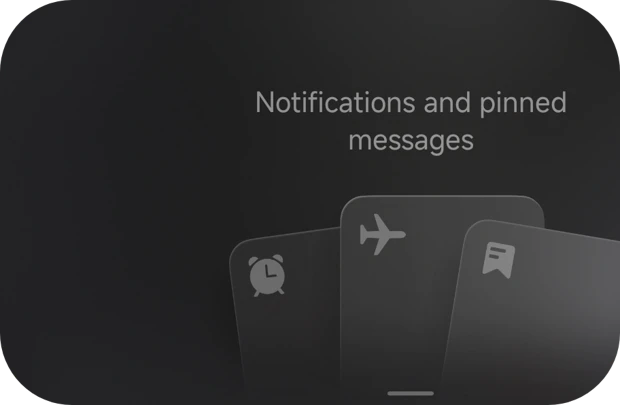


Another nice feature is that you can create your own apps using AI by entering a prompt. Xiaomi gives you 20 prompts per month, and the results vary. In addition, some apps—such as Google Maps and Spotify—display a condensed view on the second screen.
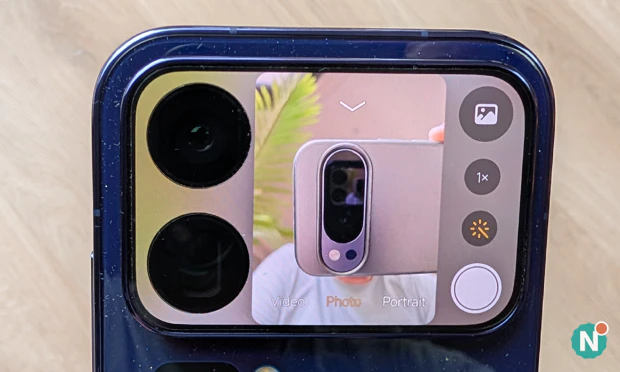
More useful is the ability to use the screen as a viewfinder to take selfies with the main camera. This works exceptionally well and is the most useful feature we found during our testing.
Useful or just a gimmick?
And after all this, we wonder whether having a screen on the back is actually useful or just a gimmick. It can be quite practical for those willing to place their phone screen-side down. Personally, we feel uneasy about placing our phone face-down because of the risk of scratches. So for us, it falls into the “fun” category and nothing more.
The Main Screen
At 6.4 inches, the front screen is relatively compact, especially since the bezels are so narrow. You can set the screen to two color schemes: Original Color PRO and Vivid. In the latter mode, colors pop a bit more—something you often see on Samsung phones. If you prefer a more true-to-life display, go with the first mode.
Privacy Screen
But aside from the excellent color reproduction, the main focus is, of course, the privacy screen. Samsung introduced this feature in the S26 Ultra, and Xiaomi is the first major manufacturer to follow suit. Xiaomi, however, takes a different approach. Whereas Samsung’s feature noticeably dims the entire screen, Xiaomi’s does not. You only realize the privacy feature is activated when you narrow your viewing angle. And even then, the screen remains quite readable from an oblique angle. More so than with the S26 Ultra. That does detract from the feature’s intended purpose.
In our hands-on, we promised to take a closer look at how the feature affects the display, and after three weeks, our verdict is nuanced. During the day, you don’t notice that it’s on, and that’s exactly where the S26 Ultra, with its visibly dimming screen, falls short. In the evening, it’s a different story: you can see that some pixels are no longer active, and the image becomes grainier and less sharp. When the feature is turned off, the screen looks just as sharp, even next to our Pixel 10 Pro with its higher pixel density.
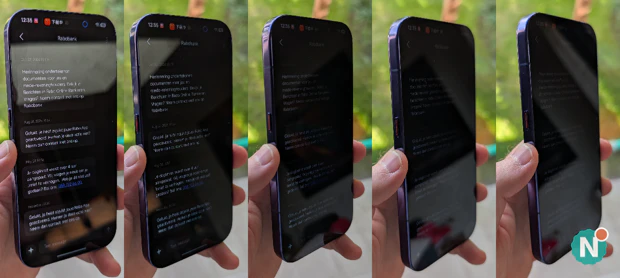
One thing Xiaomi does well is that it can activate the privacy feature more intelligently, for example, when it detects that someone else is looking over your shoulder. The 18 Pro first needs to learn your face and continuously scan to see if it detects you and anyone else. It still made us feel a bit like we were being spied on, especially since the messages “insufficient light” and “hold your phone farther away” kept popping up on the screen. The nice thing is that you don’t have to think about it after that: the Xiaomi turns it on automatically when needed. But don’t think that means no one can read along with you anymore. The viewing angle becomes narrower, but unwanted peeking is still possible.
HyperIsland
Just as Apple displays Live Activities to the left and right of the selfie camera in what’s called Dynamic Island, Xiaomi has something similar: HyperIsland. You can choose which apps are allowed to display content there, though the list isn’t very long. Removing something from HyperIsland can sometimes be a bit of a hassle. For example, Spotify doesn’t disappear automatically when you stop the music; you have to force-close the app.
Xiaomi Vision Care
We also find Xiaomi Vision Care, which is designed to make reading text more comfortable by adjusting the color temperature to the time of day. You can enable this at any time or at set times (such as sunset). If desired, you can also turn off colors and switch to a black-and-white display, which makes you less likely to reach for your phone. Other useful features include an option that alerts you when you’re viewing content that can cause extra eye strain, as well as the ability to add texture. This adds a bit of noise to the image, making it look more like paper.
Another drawback—though this might be something other Xiaomi phones struggle with as well—is that you can’t set the font size very small. We would have liked a setting even smaller than “90% light,” which, in our experience, still results in significantly larger text than on a Pixel, for example.
Performance
Xiaomi is—or rather, was—one of the first companies to use Qualcomm’s latest Snapdragon 8 Elite Gen 6 chips in a phone. The 18 Pro features the 8 Elite Gen 6, while the 18 Pro Max features the even more powerful 8 Elite Extreme Gen 6. If you order the version with 256GB of storage, you’ll get 12GB of RAM; with the 512GB and 1TB models, you’ll get an even more generous 16GB.
And we can be brief: the device easily handles everything you throw at it. During our hands-on test, we wondered how the chip would hold up under prolonged stress. To be fair: we didn’t put it through any truly intensive gaming. But during three weeks of daily use—including extended browsing and photography—the device only got warm once, and that was while wireless charging. Nowhere else.
Graphics and RAM
It’s also very powerful when it comes to graphics. We’re suddenly seeing animations in apps that we didn’t see before. It’s as if it’s just doing all of this on the side, simply because it can. We’re certainly not complaining. The 12GB in our model can be expanded to 16GB via software by reallocating 4GB from the storage memory. You often see these kinds of tricks on cheaper models because they usually have just a bit too little RAM. It’s more of a stopgap measure, though, because this feature isn’t exactly fast. That’s why we’re surprised to see it in a high-end flagship.
Software
Before we discuss HyperOS 4, we’d first like to outline the steps we had to take to get the device up and running here. A device with a Chinese ROM does have its drawbacks. These include the obvious ones, such as the lack of Circle to Search, Google Lens (the app won’t open), Android Auto, and eSIM support. But there are more limitations that only become apparent over time.
Step-by-Step Guide to Getting a Chinese Phone Working in the EU
For example, in China, they don’t use the Google services that come standard on Android phones here. Most Google apps and services can be installed and activated, but because they aren’t deeply integrated into the software, they sometimes malfunction. For example, the battery optimization feature (HyperOS PowerKeeper) often forcefully shuts down these apps and services to conserve battery life. A noble idea, but not when these services are responsible for handling your notifications (which you’ll no longer receive once the device is in standby mode).
We followed the steps below to get these Google services working as well as possible:
- Enable Google services. Installed the Play Store via Xiaomi’s own GetApps store, then downloaded the rest of the Google apps from the Play Store. In Settings > Additional settings > Accounts & sync, turned on the “Basic Google services” toggle (it was already on for us, but be sure to check this).
- Disable battery restrictions. For Google Play Services and apps that require push notifications: set battery management to “No restrictions,” enable “Background autostart,” and pin the app to the recent apps overview. This proved insufficient: HyperOS’s PowerKeeper overrides these settings and freezes Play Services via a hidden “Greezer” freezer, causing the FCM connection to keep dropping (ERR_IO_FIN).
- Shizuku + HyperOS FCM Fix. Installed Shizuku and launched it via Wireless Debugging (requires a one-time Wi-Fi connection), then granted ADB permissions to the GitHub app HyperOS FCM Fix (dingwen07). That app adds GMS to the allowlist, disables the GMS freezer, and “unblocks” the specified apps every 15 minutes. Only after this did FCM remain at “Connected.”
- Restore Play Protect certification. The Play Store initially reported “not certified.” This was resolved by clearing the data and cache for the Google Play Store and Google Play Services and logging in again; after that, Play Integrity passed at all three levels (basic, device, strong).
- Fine-tuning location accuracy. In Settings > Privacy & Security > Location > Location services, Wi-Fi scanning and Bluetooth scanning are turned off by default. Turn both on, even if Wi-Fi itself is turned off; Google Location Accuracy was already enabled. Without these scans, Google Maps only receives raw GPS data and reports “Location accuracy is low.”
- Other adjustments for use in the Netherlands. Google apps set as default (Gboard, Google Autofill, Gemini), Chinese ad recommendations disabled in Security, Cleaner, Themes, and File Manager, GetApps notifications off, Chinese bloatware disabled using Canta (via Shizuku).
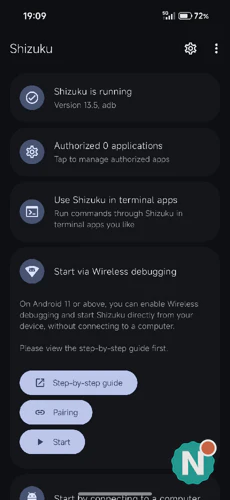
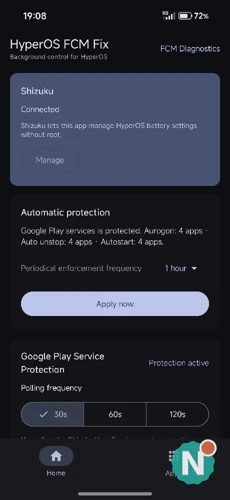
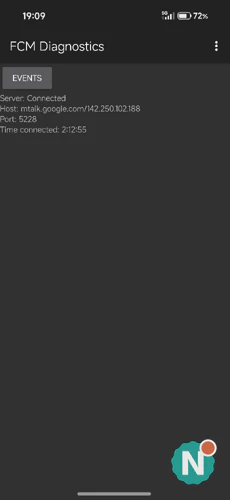
The result after following these steps: notifications are coming through, Play Integrity passes on all three levels, and contactless payments with Google Pay work just fine. The apps from Rabobank, ABN AMRO, and Brand New Day also work without a hitch—which is by no means a given on a Chinese ROM.
The Mystery of the Missing Notifications
But the tweak that helped us the most in getting notifications to work is deeply hidden within HyperOS 4. You can configure notifications on a per-app basis (just like on virtually any Android device), but with Xiaomi, it works a little differently. When you open an app for the first time and it asks if it can send you notifications, a single “yes” isn’t enough. Strangely enough, the ability to display notifications, play a sound, and/or show a badge (the number above the icon) is turned off by default. The result? No notifications, even though you assume you’ve granted permission for them.
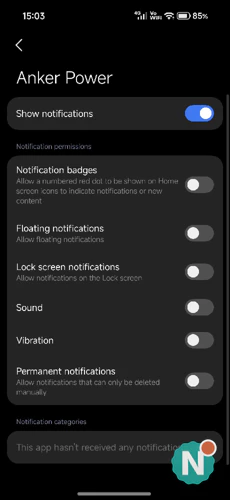
Sometimes an app even goes so far as to require you to check a box for each individual notification type to allow visuals and sounds to be displayed and played, which can take a bit of time to set up. We were quite frustrated by this at first, but it turned out to be the missing link in finally receiving notifications on our Chinese phone.
HyperOS 4
Anyone ordering a Chinese Xiaomi 18 Pro (Max) can choose between English, German, French, and Portuguese in addition to Chinese. In our hands-on review, we mentioned the lack of Dutch as a drawback, but if you really want Dutch, you can get it to work for the most part using SetEdit. You can see an explanation of how to set this up in the video below.
For the tweaker: forget about flashing the software. The bootloader is locked, so you can’t install the Global ROM.
Liquid Glass without Chinese
Version 4 of HyperOS clearly borrows elements from iOS with Liquid Glass. However, with Xiaomi, you can also turn these effects off or tone them down a bit. What does make us happy is that you can easily remove or disable all the Chinese apps. Even the built-in AI functionality, which is usually only available in Chinese, can be easily disabled with a toggle. Whereas the Oppo still regularly spoke to us in Chinese, that doesn’t happen with the Xiaomi.
Hardware
The big advantage of a Chinese phone is that you get a massive battery. The one in the Xiaomi 18 Pro is 7,000 mAh, making it one of the larger ones. The European version has a 6,000 mAh battery, according to the European energy label; more on that in the conclusion. It’s also nearly impossible to drain completely: three days of use is not uncommon, but the downside is that you might forget to charge your phone, so daily charging is recommended. That’s exactly what happened to us, and even then we still had more than enough battery left in the evening. Having that much extra capacity is especially handy when you’re away from home longer than usual. You don’t have to worry about charging in between uses, and that peace of mind turned out to be more valuable than we’d anticipated; it’s hard to put into numbers.
Charging
Charging is a bit of a challenge. It takes a while to fully recharge such a large battery, especially if you’re charging it wirelessly via Qi. With a standard Qi charger, it’s practically useless: even a whole night isn’t enough to fully charge it. Use a regular USB charger from a friend, and even then it’ll take a while. Only with the included 100W charger can you get it fully charged in no time. Wireless charging can actually be fast, but only with the separately available 50W wireless charger. It’s a shame there aren’t any built-in magnets to make it easy to align the device with the charger. A case is the only solution in that case.
Vibration Motor
The biggest surprise from our hands-on experience is still a surprise after three weeks: the linear vibration motor (type 7514) is impressively powerful. Xiaomi claims 75 percent more power, without specifying what it’s comparing it to, but it’s clear that it packs a punch. So clear, in fact, that we turned down the intensity in the software; at maximum, it was a bit too much for us. If you do set it to full, you’ll never have to worry about imagining vibrations again: you won’t miss a single notification from this phone. That bodes well for the 18 Pro Max, which will feature an even more powerful version.
Unlock
Also worth mentioning is the smooth in-screen fingerprint scanner. That comes as no surprise: it uses ultrasonic sound to read your fingerprint. This is relatively faster than optical scanning, which uses light. You can also unlock the phone with your face or with a nearby Bluetooth device.
Calls and 5G: Don’t Blindly Trust the Specs List
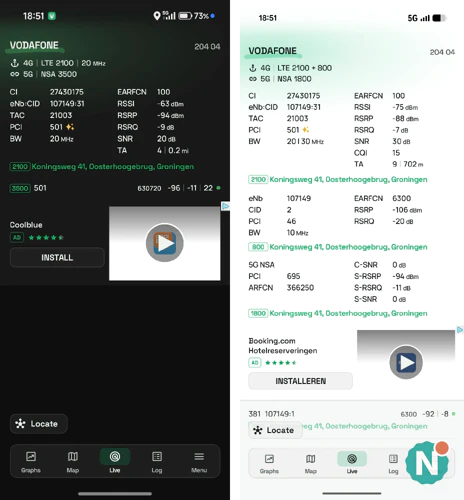
Calls via VoLTE and VoWiFi work just fine, and so does 5G. But take a close look at which bands the device supports, and don’t take Xiaomi’s spec sheet at face value. It properly lists n28 (700 MHz) among the 5G bands, complete with the European frequency allocation. In our test with Vodafone, however, that band never appeared on the Xiaomi. A Pixel in the same location did connect to it immediately, just as it did with the 1500 MHz band that Vodafone pairs with it for extra speed. The 700 MHz band is precisely the one that Dutch carriers use for coverage indoors and outside city centers, so you’ll see the 4G icon more often in those areas than you would with a European device. Incidentally, TradingShenzhen itself warns about this in the compatibility check on the product page, and in this case, the seller was right and the manufacturer was wrong.
That also makes us cautious about another footnote in that same spec list: according to Xiaomi, band n3 (1800 MHz) will only be available “after a software update.” And indeed: at the exact same time and on the same cell tower, our Pixel 10 Pro connected to the Vodafone network via 5G at 1800 MHz, while the Xiaomi 18 Pro remained stuck at 3500 MHz. So the Xiaomi only uses 5G on Vodafone at 2100 and 3500 MHz and falls back to 4G outside of those bands. Another thing we noticed: the Pixel regularly bundled two bands (2100 and 800 MHz) on 4G, while the Xiaomi never did so in our test. It remains to be seen if and when that software update will reach the Chinese firmware. We expect to see the same results with KPN and Odido, which also use bands n3 and n28. Want to check which band you’re on yourself? A free app like NetMonster shows you that in real time.
Camera
Xiaomi equips the 18 Pro and 18 Pro Max with a 200MP main camera, a 200MP telephoto camera, and a 50MP ultra-wide-angle camera. The 18 Pro features OmniVision’s Light Hunter 960 sensor, while the larger 18 Pro Max uses the 960L. Both sensors are the same size, but the 960L features LOFIC, which delivers better HDR performance in low light.
Photo Quality
Things that stood out during extensive testing: photos sometimes lack a bit of sharpness; at first glance, the results look good, but zoom in a bit and you’ll notice some blurriness here and there. Results in the dark or at dusk are quite good, so we’re happy to overlook the occasional blurriness.
200MP or 12.5MP?
By the way, don’t take photos in 200MP—stick to the 12.5MP setting. That advice isn’t because of the quality of the photos, but more because of their file size. A 200MP photo can easily reach 35MB, while a 12.5MP photo is around 5MB. If you take a lot of photos, you’ll be able to store a lot more in the memory. Similarly, filming in 8K—which this device is capable of—is also not recommended. Such video files take up an enormous amount of space.
Zoom and Selfies
We also advise against zooming in beyond 50x. AI takes over at that point, and very little remains of what you’re trying to photograph. The Pixel series excels in this regard, as it simply generates details based on AI—which, in practice, works surprisingly well (except on faces).
Another handy feature is that the selfie camera gets a boost from the 4,000-nit bright screen. It glows bright white when you ask it to—perfect for anyone who needs a little extra light in the dark. Though Xiaomi could have left out the selfie camera altogether, since you can take much better selfies using the main camera and the second screen as a viewfinder.













































Conclusion
The Xiaomi 18 Pro is a phone of extremes. The hardware is of a caliber you’d normally pay a multiple of the price for: a battery that lasts three days, a chip that’s nothing to write home about, an ultrasonic fingerprint scanner, and a second screen that turns the main camera into a selfie camera. On the other hand, the software requires you to get it working yourself. The step-by-step guide above took us a few evenings, and every HyperOS update can undo those solutions. The privacy screen—the main reason we ordered it—is ultimately mostly just a gimmick: fun to show off, but for anyone who truly doesn’t want their neighbor peeking over their shoulder, it doesn’t do enough.
Then there’s the price. We paid €857 for the 12GB/256GB version, including shipping and import fees. An iPhone 18 Pro costs €1,375 and doesn’t offer anything more in any area; in terms of battery life, charging speed, and the second screen, it actually falls short. Even factoring in the evenings spent tweaking it, the value for money is excellent. And the European version only makes that difference even greater. In our hands-on, we predicted—based on the Xiaomi 17 Ultra, and that’s exactly the case: according to YTechB, the European Xiaomi 18 Pro costs €1,449 for the 256GB model and €1,649 for the 512GB model, and, according to the energy label, has a 6,000 mAh battery instead of 7,000 mAh. That’s nearly €600 more than we paid, for a device with a shorter battery life. Be sure to factor in the risks we mentioned: no store around the corner in case of a defect, 4 to 10 weeks for repairs through TradingShenzhen’s partners, no Android Auto, no eSIM, and no Dutch as a system language.
On paper, the iPhone 18 Pro is the competitor: Xiaomi copies the name, the design, and even the Dynamic Island. But iPhone users rarely switch, no matter how much cheaper the Xiaomi is; iMessage, the Apple Watch, and habit carry more weight than a €500 price difference. On the Android side, it’s trickier: a compact flagship with these specs doesn’t exist there yet. The 18 Pro shares many features with the Galaxy S26 Ultra, including the privacy screen, but is one size smaller; Samsung’s answer in this size—an S27 Pro—hasn’t been officially announced yet. For those who don’t want to import, that leaves three options. The Xiaomi 17 Pro is readily available here with a European warranty and the same secondary screen, but with a smaller battery and last year’s chip. You could also wait for the European Xiaomi 18 Pro, but at that price point, it’s a bad tradeoff: you’re paying more than for an iPhone and getting a smaller battery, in exchange for a warranty and Google services that work right out of the box. And if you want a hassle-free Google experience with better zoom and Android Auto, you’re better off with a Pixel 10 Pro, at a higher price and with a smaller battery. This phone is for the buyer in between: someone who wants the latest model, isn’t afraid to spend an evening setting it up via ADB, and gets the largest battery and the lowest price in return.
That leaves the question that occupied us throughout the entire test: will the European version be worth the wait, or is the Chinese version with the larger battery ultimately the better 18 Pro? Given the European price tag, that’s no longer a question for us. You’ll have to decide whether you’re willing to sacrifice a few evenings and take on the warranty risk for it.

