Less screen time: The ultimate guide to a digital detox on your smartphone
The constant stream of notifications and mentions is causing digital fatigue for many. The need for a "digital detox" is growing, but how do you do it without being unreachable? From smart software tips to the rise of the dumbphone, we guide you to less screen time.
GWI research shows that nearly 40% of young people between the ages of 16 and 24 worry about the time they spend on apps. And it's not just worries; some also experience physical symptoms. Examples include eyestrain, sleep problems and self-confidence issues. But what can you do about it?
1. Buy a dumbphone!
Of course, you can throw your cell phone out the window but then you'll be completely out of touch, even in case of emergencies. Better to go all the way back to basics. Get a phone that only does what it was originally made for; to make calls.

A dumbphone does just that. You can call and text with it. There are no apps on it that bother you all day, and an added benefit: It doesn't need to be charged every night. A week on one charge is no exception. With a dumbphone, you'll be off your social media addiction in no time. And still looking for some distraction? Some dumbphones have built-in games like Snake.
The best dumbphones right now are:
| Nokia 105 4G (2024) | Although this phone has 4G, it is only meant to be used for high quality calling (Voice over LTE). |
|---|---|
| HMD 130 Music | No camera but it does have a huge speaker on the back for your music. |
| HMD 105 4G | Looks more modern. |
A dumbphone does not necessarily have to be the replacement for your smartphone, it can also serve perfectly well as a reserve phone. With a starting price of just a few tens, you already have one in your home. Going to a festival sometimes? Take your dumbphone with you and leave your smartphone at home. Lose it? A shame, but not a financial disaster. A dumbphone can also be your child's first phone. No harmful apps, just accessible.
Do you still want a camera?
For those for whom the above options are too hardcore to kick off, there are also models with a camera. For example, consider the Nokia 3210 4G or the HMD 2660 Flip 4G. These models also have Bluetooth so you can listen to music wirelessly with your earbuds.
2. Software options
You don't have to buy a new cell phone right away to kick your phone addiction. There is also software that can help you. For example, you will find a special Detox Mode on several HMD smartphones. This deactivates social media apps and stops notifications from them coming in. You choose how long you don't want to be disturbed.
Detox Mode is available on the HMD Skyline and Fusion. The Fairphone 6 also has that option via a slider on the side. If you don't have those phones then fortunately there are alternatives.
Android: Digital well-being
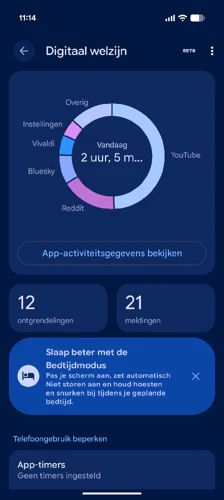
For example, since 2018 Android has had a setting called Digital Wellbeing. In it you can see how much time you spent on which app per day, useful for insight, but you can also set app timers. So you can set a hard limit for your Facebook usage, for example.
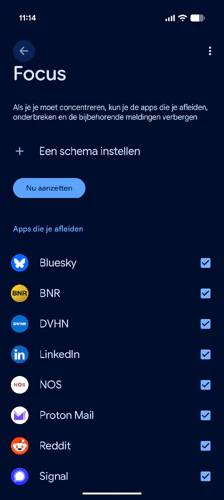
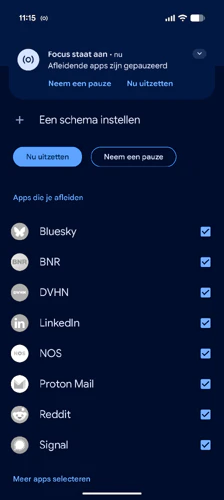
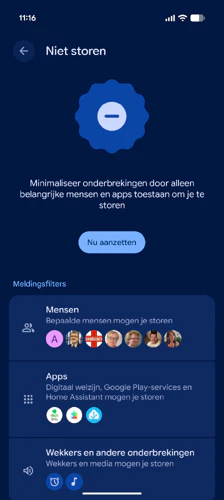


If you need to study or work hard for a while, there's Focus mode. Here you can set which apps you will temporarily not receive notifications from. You also cannot open these apps, provided you turn focus mode off again. A disadvantage of this may be that phone calls no longer come through. If you prefer to do that, it's better to turn on Don't Disturb mode. Here you can select contacts to always disturb you.
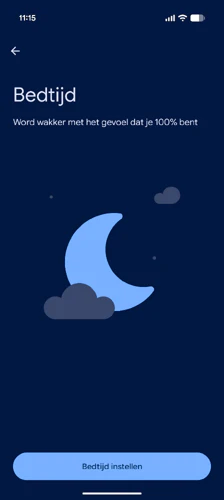
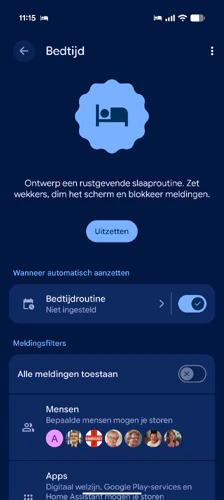
For the necessary sleep, there is Bedtime mode. In it, you set a fixed time when your Android smartphone goes silent and the screen goes black and white. This automatically ensures that you put your phone away on time and get the necessary rest.
iOS: Focus Features
If you are on team Apple then similar features are available. Since iOS 15, Apple has dedicated Focus and Screen Time features. The approach is a bit different from Android, so you create special profiles that tell iOS what you are currently doing.
So you can create Focus modes for work, personal or weekend. The beauty of iOS is that you can also link your home screen to a Focus Mode so that all the pages of games disappear when you have Work Mode on, for example. This gives more peace of mind and keeps you from realizing you can't open certain apps.
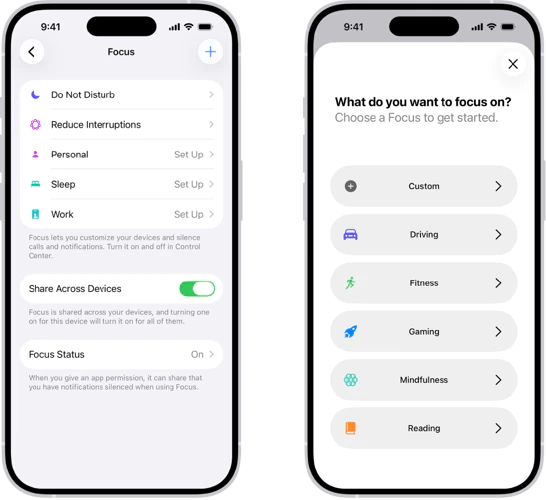
If you want to be a little less disturbed for a while and not get a notification from every notification, there is Planned Overview. It collects similar notifications and presents them as summaries at specific times. You can set at what time you want to receive a scheduled summary from which apps.
If you really want to be hard on yourself, or need to be, there is Screen Free Time Set. Here you block certain apps for a fixed duration. You won't be able to open them or receive messages from them. Phone calls will come through, however. Use this option, for example, before you want to sleep.
Three immediately applicable strategies for digital tranquility
Hopefully we were able to give you inspiration that you can get started with. However, do you want peace of mind right now? Then these are our three best tips for getting more rest within a minute immediately:
1. Stop the red balls (The Badge-Ban)
Those little red counters on your app icons are designed by psychologists to increase your stress level and hijack your attention. Do you really have 43 unread emails that need your attention right now? Probably not.
- The action: Go to your settings and, for all apps (except maybe Phone and Messages), turn off the "Badges" or "Notification Dots."
- The effect: Your homescreen changes from a to-do list ("I still need to look!") to a toolbox. You open the app when you have time, not when the bullet calls.
2. The bedroom separation
This is not a software setting, but a physical action. The number one cause of poor sleep and "doomscrolling" in the morning is the phone on the nightstand.
- The action: Grab your charger. Walk to the kitchen, hallway or living room. Plug it in there. That's your phone's permanent sleeping place from now on.
- The effect: You'll start and end your day with your own thoughts (or your partner's), instead of the opinions of strangers on the Internet. (Tip: Buy a tenner alarm clock today).
3. Adjust your WhatsApp status
We are afraid not to respond because we don't want to seem rude. Manage the expectations of others, then you won't have to check in constantly.
- The action: Change your WhatsApp status (now 'Info') to: "I check my messages 2x a day. Call me for urgency."
- The effect: You remove social pressure. People know you are not ignoring, but focusing. You create a digital fence around your own time.