

First Phone for Your Child
Which one will you choose, and do you even need one?
The question is rarely "What phone should I get for my child?" but rather, "What problem am I trying to solve?" Do you want to be able to reach your child and know where they are? Or do they need a phone to keep up with the class? Two of those three things don't require a smartphone. If you do decide on a phone, you’re probably thinking of a simple phone, even though you can also completely lock down a smartphone. This buyer's guide walks you through the options, from smartwatches to restricted smartphones, and helps you choose what's best for your child.
Why First Phone Is Bigger Step Than You Think
Giving a phone feels like a small gift, but it opens up a whole new world. Especially with a smartphone: it not only provides reachability, but also a window to the internet, group apps, games, and—soon—social media. And that’s exactly where the risk lies.
Research has become more robust in recent years. A large-scale study in the journal Pediatrics (early 2026) links smartphone use at a young age to a demonstrably higher risk of depressive symptoms, obesity, and sleep problems. Blue light can inhibit melatonin production for some time, leading to later bedtimes and poorer sleep. Added to this are concentration problems, peer pressure in app groups, and unwanted contact.
Concern is widespread. In May 2025, a collective of approximately 1,400 doctors and scientists, united in Smartphone-Free Upbringing and supported by more than 50,000 parents, called on policymakers to set a minimum age of 14 for a first smartphone and 16 for social media. That is even stricter than the government’s subsequent guidance. The message isn’t that phones should be banned, but that “too early and too much” is harmful, and that you should therefore take that step consciously and as late as is reasonable.
This doesn't mean your child shouldn't be reachable. It means you can separate the function (contact & safety) from the device (a full-featured smartphone). Often, much less is enough.
Wait a little longer if the only real reason is “everyone has one,” or if your child still struggles with keeping commitments and self-control. Delaying isn’t a punishment—it saves years of worry.
Do start if there’s a specific need (going to school alone, playing sports, being reachable) and you consciously choose the lightest device that meets that need.
What Do You Actually Want to Solve?
Before looking at devices, this is the most important question. Most parents want one of these three things, and each requires something different.
Reachability. You want to be able to call your child and for them to be reachable, for example, when they’re going to school or a club on their own. A smartwatch with a calling feature or a simple phone is sufficient for this. No internet needed.
Knowing where your child is. Above all, you want peace of mind: did they arrive safely? In that case, you’re really looking for location tracking, not communication. A GPS smartwatch or a standalone GPS tracker is designed for this purpose.
Social interaction. The class chats via a group chat, and friends make plans online. Only now does a device with WhatsApp (and thus a smartphone) come into play. And this is precisely the need associated with the most risks.
- Do I want to be able to reach my child?
Smartwatch with calling feature or feature phone. - Do I want to know where my child is?
GPS smartwatch or standalone GPS tracker. - Does my child need to be able to participate online?
Restricted smartphone—and only when your child is ready for it.
Alternatives Before Starting with Phone
For “reachability” and “location tracking,” a phone is often overkill. Two alternatives do the job without the open internet.
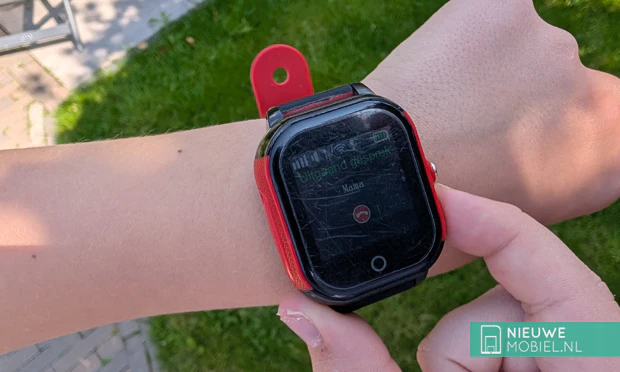
The kids’ smartwatch. A watch that lets your child call a set list of contacts or send a voice message, plus live location tracking and an SOS button. No open internet, no app store, no social media. Popular choices include the One2track Connect Up and the Garmin Bounce 2 (approximately 260 euros plus a mandatory subscription of around 11 euros per month, and with 5 ATM water resistance, one of the few that’s truly suitable for swimming). A Dutch brand like One2Track (servers in Apeldoorn, no fixed subscription) is interesting for those looking to keep monthly costs down.
The standalone GPS tracker. Do you just want to track location, without your child having to operate anything? Then simply place a tracker in their backpack or jacket pocket. Options like the PAJ Easy Finder 4G or the Invoxia (which operates on the LoRa network, without a SIM card) are designed for this purpose.
Be aware of one common misconception: an Apple AirTag is not suitable for this purpose. Apple itself explicitly states that an AirTag is intended for finding lost items, not for tracking people or children. It has no live GPS, no call function, and no SOS button, and the device actually actively alerts the wearer that an “unknown” tracker is tagging along. To track your child, choose a dedicated child tracker or smartwatch; save the AirTag for your keys and suitcase.
Choose a smartwatch if you want your child to be reachable and locatable and to be able to make calls on their own. All-in-one, visible on the wrist.
Choose a standalone tracker if you want location tracking only and the device needs to be invisible and low-maintenance, without your child having to do anything.
If Choosing Phone: Feature Phone Preferred Over Smartphone
If it turns out a real phone is necessary, our advice is clear: for a child, choose a dumbphone over a smartphone. This aligns with advice from doctors and the government, and it will save you a lot of worry. A smartphone is an option, but only as a deliberate, strictly limited exception.
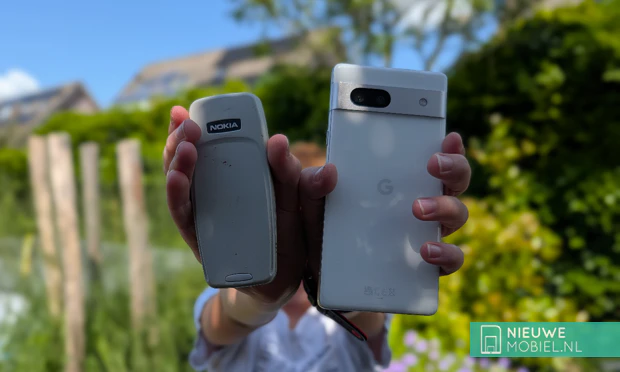
The feature phone: our preference. This is probably the image you have in mind: a device that makes calls and sends texts, perhaps with a small camera and a radio, and not much else. A modern Nokia 105 4G or an HMD model works just fine on today’s network, lasts for days on a single charge, and is virtually indestructible. There’s hardly any peer pressure, and for kids, it’s the most straightforward and safest phone. Two things to keep in mind: most true “dumbphones” don’t run WhatsApp, so if your child needs to join the class group chat, you’ll run into that issue. And pay attention to the model: some devices (especially those running KaiOS) do have a simple web browser and sometimes a mini app store, which in theory could let you access Facebook or YouTube. If you really want to block access, choose a model without a browser, or turn off the browser and data.
The restricted smartphone: only if you specifically want it. We don’t recommend a smartphone for a child, but you’re of course free to choose one anyway—for example, if your child in high school really can’t do without WhatsApp. If you do, do it right: completely lock down the device with parental controls. No access to the app store without permission, screen time limits, filters, only calls, and a few approved apps. This effectively turns it into a “bare-bones” phone, with the option to expand its capabilities later. An entry-level model or a refurbished device will suffice; you don’t need to buy an expensive phone for this. In the next section, you’ll learn exactly how to set it up.
| Type | Calls/text messages | Location | Open Internet | Suited for | |
|---|---|---|---|---|---|
| Kids’ smartwatch | Yes (fixed list) | Yes | No | No Editor-in-Chief As the founder of NewMobile, Martijn is responsible for the technical and strategic development of the platform. With a background in ICT, he developed the website independently from its inception in 2002 and continues to maintain it to this day.  Contactform |