
Bought Google Pixel 10? Then change this setting right away
You have taken the plunge and purchased a new Pixel 10. Congratulations on your purchase, we're sure you're going to love it! But wait, be the first to change this setting to unlock the true power of the Google Pixel 10.
This year's new Pixel 10 comes with a third rear camera, a brand-new Tensor G5 chip and, of course, every possible AI feature imaginable. The screen has also gotten a little brighter with a maximum peak brightness of 3,000 nits. And yet it could be better.
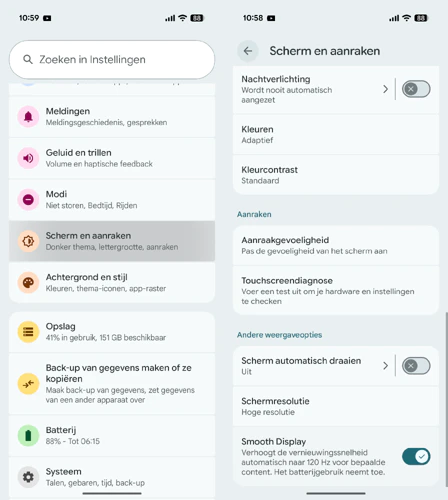
Because Google supplies the Pixel 10 with a refresh rate of 60Hz by default out of the box. To enjoy the full 120Hz, you have to adjust a setting. Google calls this Smooth Display and you can find the setting under "Screen and touch."
Smooth Display is off by default on Pixel 10
Google justifies not activating Smooth Display by default because it saves battery life. Also, some people don't see the difference between 60 and 120Hz. If that's the case with you, it is recommended to leave the setting at 60Hz and enjoy that extra bit of battery what that savings provides.
Even in 120Hz mode, the LTPO screen of the Pixel 10 can switch back to at least 60Hz if no motion is detected. On the Pixel 10 Pro models, the screen can even go down to 1Hz. For all those other people who want to get the most out of their phone, our advice is; just go to the settings and flip that checkmark for much smoother images and transitions.