Why one USB cable is not the other and which one you should have
The USB-C jungle unraveled
Last week, I needed new USB-C cables for a charging station. Instead of pulling random cables out of my drawer, I bought new ones of a similar color and length. Once inside, some of the cables turned out not to work as I expected. But why not? Join me as I dive into the complex world of USB standards.
USB: the promise of one cable for everything
USB stands for Universal Serial Bus and was originally invented to connect peripherals such as a mouse or keyboard to your PC. Meanwhile, we know the connection primarily as the port you use to charge a smartphone. USB-C has since been embraced, in part due to European regulations, as the standard port for cell phones. This was supposed to put an end to the various cables and chargers.
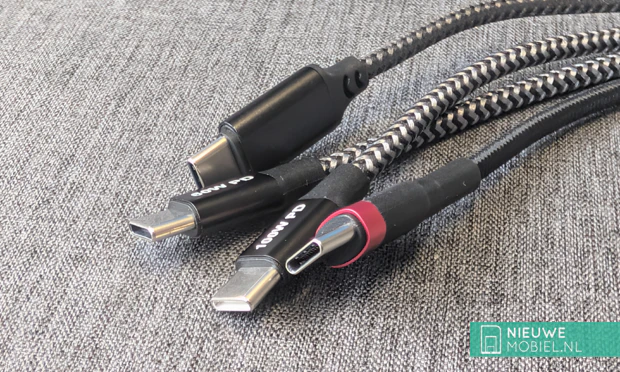 .
.This has succeeded anno 2026. Every phone manufacturer is releasing its products with USB-C with the added benefit that you can use any USB-C charger and cable. The advantage is that you can basically use any USB-C charger. Moreover, the plug is symmetrical, so the orientation when plugging it in doesn't matter. But there are exceptions.
The anatomy of USB-C: More than just a plug
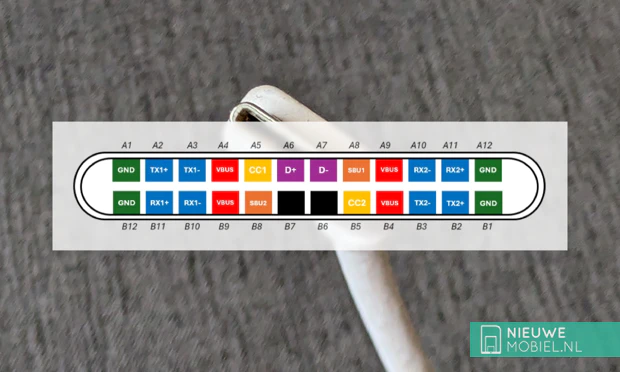
But before we dove into the issues, let's zoom in on the port itself. USB-C succeeded microUSB in 2014 and consists of 24 pins. There are pins for data, audio, video and power, and because the pins are mirrored, it doesn't matter how you plug the cable into your phone. The USB-C specification defines only the physical shape of the connector, not the data or power capacity. Protocols, such as USB 3.2 or USB4, are responsible for this.
Compare a protocol to the language it speaks. Some languages are more efficient than others and therefore achieve higher data rates. For example, the maximum theoretical data rate of USB 2.0 is 480 Mbit/s. Copying a 4GB movie would then take 2 minutes. If you use USB 3.0 then speeds of up to 5 Gbit/s are possible, allowing that same movie to be transmitted in as little as 10 seconds.
Yet we use most USB-C cables not to transmit data, but to charge your phone. In theory, any USB-C cable is capable of powers up to 60W (3A / 20V). However, not every cable manufacturer strictly follows this guideline.
Higher powers are possible when these USB cables adhere to the Power Delivery specification. For example, there are cables that go up to 240W (5A / 48V). That's enough to charge your phone from 0 to 100% in minutes.
Fast Charging: Why your cable is the bottleneck
Charging your phone will work with just about any USB-C cable, but to enable fast charging, more is needed. The very first question you need to ask yourself is, what fast-charging technology does my phone use? Only then can you look for a matching cable and charger.
| Technology | Brand | Protocol | USB-PD compatible? | Cable | |
| USB Power Delivery (PD) | Apple, Google, Laptops | The Standard | Yes (Is the standard) | Standard USB-C (60W+) | |
| Super Fast Charging 2.0 | Samsung | USB-PD + PPS | Yes, full | 5A / 100W cable required | |
| Quick Charge 4, 4+ and 5 | Sony, ASUS, various | USB-PD + PPS | Yes, fully | Standard USB-C | |
| TurboPower | Motorola | USB-PD / QC | Yes, mostly | Standard USB-C | |
| SuperVOOC | Oppo, OnePlus | Own | Own | Limited | Special brand cable |
| HyperCharge | Own | Partial | Special brand cable, often 6.5A and custom pin layout | ||
| SuperCharge (SCP) | Huawei | Own | Bad | Special brand cable (Purple) | |
| Quick Charge 2.0 / 3.0 | Older Androids | Own (Qualcomm) | No | Many USB-A to USB-C |
If your phone deviates from the USB-PD standard, a different cable may be necessary. Note here that you will also need a matching fast charger, otherwise you will go back to a safe level in terms of charging speed. So this is almost always needed when you want to charge faster than 60W.
The invisible culprit: the E-marker chip
But how does your phone know it's allowed to fast charge? For that, most USB-C cables have a built-in chip. This E-marker chip talks to the charger and your phone and agrees on what amperage and voltage are safe to use. Without this verification, the charger limits power to prevent overheating of the cable. The chip is mandatory if you want to use more than 60W. If your cable does not have an E-marker chip, and you do use a 100W charger, then charging your phone automatically drops to a maximum of 60W.
What to look out for when buying a fast-charging cable?
If you want to charge your phone at higher speeds than 60W then you need to pay attention to the following things. Look for the following things on the cable or packaging:
- The Wattage (The 60W vs. 100W/240W rule)
- Many times it says "60W" or "100W" big on the packaging.
- Have a laptop or Galaxy phone that charges at 45W or more? Always buy the 100W or 240W version. These have the mandatory E-marker chip. A 60W cable will often limit a fast Samsung to 25W.
- USB-PD (Power Delivery) & PPS
- What you see is "PD 3.0," "PD 3.1" or "PPS."
- This is essential for iPhone, Google Pixel and Samsung. Is there no "PD" on the package? Then chances are that the cable is only meant for older chargers and your modern phone is agonizingly slow to charge.
- The brand-specific terms (For the "fast Chinese")
- What you'll see: "SuperVOOC," "Warp Charge," "HyperCharge" or "SuperCharge."
- Do you have a phone from Huawei, Oppo, OnePlus or Xiaomi? Preferably buy the official cable from the brand itself. These technologies often use an extra pin or a specific resistor that universal cables do not have. A universal 100W PD cable will often not charge faster than 18W on a OnePlus.
- The "Ampere Check" (The 5A Label)
- What you see: "3A" or "5A."
- If it doesn't say wattage, look at the amps. 3A is standard (max 60W). 5A is the powerful version. For almost any fast-charging technology above 30W, a 5A cable is the safest choice.
- The color of the port (The Huawei/Oppo/OnePlus trick)
- What you see: A purple, orange or red inside of the USB plug.
- This is often a visual cue from manufacturers. Do you see a cable with a purple interior? Then it's specifically designed for Huawei SuperCharge. A red or orange interior often indicates Oppo/OnePlus. Use these colors as a reminder to fish the right cable out of your drawer.
- The official USB logo (USB-IF certification)
- What you see: The official USB logo with the speed (e.g., 40Gbit/s) or wattage (e.g., 240W) embedded in it.
- Costly cables from the budget bangers almost never have this logo, because the testing procedure costs money. Do you see this logo? Then you can be sure that the cable meets all safety requirements.

More than just charging: Why your cable determines what else your phone can do
Besides charging, your USB-C cable can do more. Sending data, for example. Handy for setting up a new iPhone and migrating images and videos. But as again, exceptions apply. The speed of data transfer is determined by the protocol being used. For example, USB 2.0 (from 2000) transfers data significantly slower than USB 3.2.
For example, the iPhone 17 only supports USB 2.0. Copying 10GB of videos then takes 5 minutes. The USB 3-compatible iPhone 17 Pro takes just 12 seconds to do so with 10Gbit/s support.
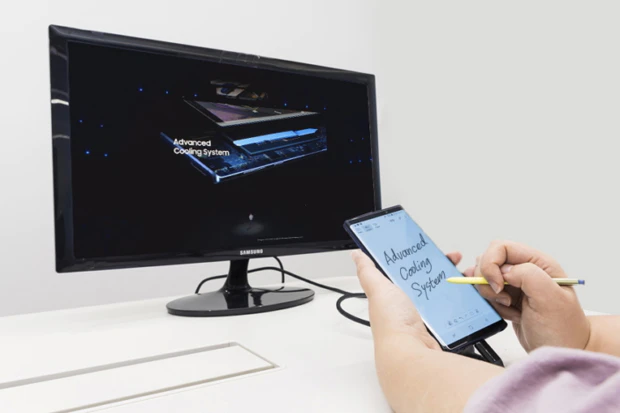
But you can also sometimes use the cable to send video (video output). If your phone supports DisplayPort Alt Mode then you can connect it to a TV or monitor. Samsung DeX is an example of this. Again, you have to pay attention to the USB-C cable; it must have the pins for video data.
And so that simple cable, that cable that always fits and always close turns out to be a lot more complex in reality. Hopefully this story will help you figure out the right cable for the right job.